

AI is taking up a lot of space right now, welcome or unwelcome. It’s in our apps, our social media posts, the markets, and even notices from our kids’ schools. There are also nonstop stories about fears, real or imagined, of the impact of AI as it continues to expand. So when we’re asked at work to use AI more, it does not always land well.
AI is more powerful, and more approachable, than you might think. With the swirl of information out there, I wanted to take the time to give you the information and confidence to get your own AI adoption plan underway.
Let’s start with how we got here; AI advanced from asking ChatGPT a question to building whole products in such a short amount of time.
2026 Changes to Artificial Intelligence
January 12, 2026.
Claude introduced the world to Cowork, which changed everything. A $20-200 subscription could now perform tasks as powerful as the most premier SaaS subscriptions. At around the same time, OpenClaw started to gain more traction, and we saw how one individual could create a massive proliferation of agents to operate as their fleet of personal assistants.
AI has no longer just entered the chat, it is building your chat interface design and functionality!
And that is the best way to think about AI: as an amazing Operations Analyst or Chief of Staff that is leveling up your game. There was a time when you had to learn how to use spreadsheets and advanced formulas, pivot tables, and macros. The same parallel exists with other tools. The time invested in learning how to use these functions helped you become a more capable and confident employee. You’re destined to master this too!
Leadership Has the Opportunity, and Mandate, to Push AI Adoption
There is a lot of “data” being cited about the current level of AI adoption that is worth taking a closer look at. The rational mind, as noted by the Heath Brothers in their seminal book, “Switch,” causes many of us to rely on numbers to justify what we do.
A couple of recently published research reports point to the claim that “95% of Generative AI pilots fail to move beyond the implementation phase” (MIT GenAI Divide report) and that “56% of CEOs reported neither revenue gains nor cost reductions attributable to AI during the previous 12 months” (PwC 2026 Global CEO Survey).
The reality is that AI is driving a tremendous amount of value for organizations, especially at the startup and SMB levels. What was once cost-prohibitive or too time-consuming to tackle is now much more approachable.
What we are observing across failed projects can be attributed to a leadership challenge, not a technical one. This can be driven by events such as:
- Lack of support for AI experimentation
- Poor collaboration and coordination across teams
- Mixed messages on adoption
- Lack of clarity on tangible AI use cases
- Plain old infrastructure challenges
To round this data out, Stanford University’s 2026 AI Index Report shows that AI adoption is outpacing that of all of the other technological innovations in the last century: computers, internet, and email.
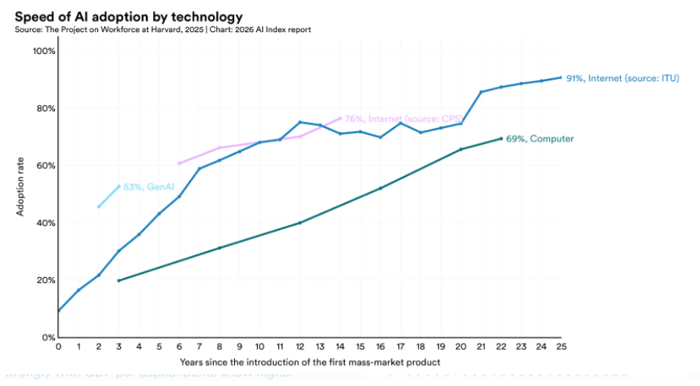
While still behind, AI is clearly advancing at a rapid enough pace to disrupt many aspects of engineering and non-engineering functions.
TL;DR: You might feel like you’re behind, but you can easily catch up.
How to Enable Your Team in AI Experimentation
Brainstorming
10 minutes of brainstorming. 24-48 hours of marinating.
Categories
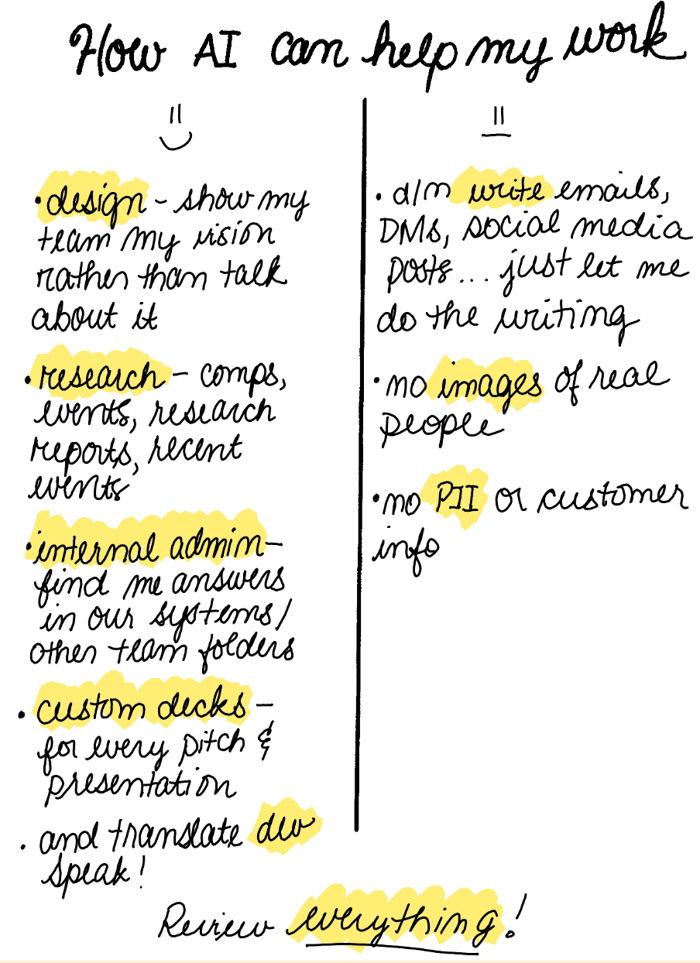
Start by writing out high-level categories of things you would like help with, either tasks you haven’t been able to do yourself or ones you would like your team’s support with but they are equally busy.
Tasks
Take those categories and write out the specific tasks you want done. Note: it’s okay, and expected, to pivot back and forth between task and category.
Optional: I like creating a list of my ‘oh no-no’s’ - things I definitely don’t want AI doing for me just yet. For example, I don’t let AI write content for me or respond to emails. It’s a popularly cited use case however, as a leader, my words are an important part of my identity and I also don’t want to be a part of absorbing “AI Voice” and how everything just reads the same.
Walk away!
One of the most powerful ways to help your brain help you is by giving it space to let an idea marinate. Allow yourself to get back to work and daily living and then come back to your list in a day or two to see if inspiration struck or if you want to make any changes.
Execute
I’m a big fan of Claude Cowork so this is written from that perspective.
Initial Setup [Optional]
I’m deliberately keeping connectors, MCP servers, and organizational integrations out of scope. This is often a reason cited for why someone shouldn’t get started and it shouldn’t be the barrier to you realizing value. You will see benefits without all of these set up.
Kickoff
- Start with your first project.
- Provide clear instructions. Remember that this is your junior analyst so instructions need to be specific and brief.
- Check the output and provide feedback until you are satisfied with the final product
- That’s it!
Check your work
Review before you ship. In banking, we used a maker-checker format: an analyst would build the financial model and an Associate or Director would review it. That same logic applies here – imagine that this is a junior-level analyst where you have to review everything before you present or submit it.
Helpful Tips
- Like any good manager, I end my prompt by asking Claude “What else do you need to know to help you set this up successfully?” Claude ALWAYS has 1-3 questions for me and this one small move means that my first draft is pretty close to being a final draft
- I also ask people for templates and skills if I see something I like: what style guide did you use to create that presentation (no more PPTs, it’s all HTML or Google Slides!)?
You’ll notice that the largest section in this writeup is “Brainstorming.” This is deliberate.
The project you embark on and how you define the instructions is what determines your success or not. Remember: Execution is now handled by your AI agent, that’s where your time is freed up! Investing 10 minutes upfront will save you 1-2 hours, or more, depending on the use cases defined.
You’ve Got This!
I hope this encourages you and makes you feel less intimidated about using AI. Case in point: As someone who spends most of my workday speaking and presenting, I have yet to install Powerpoint.
Good management skills are more important than technical skills. So you’re already ahead of the game.
Let me know what you build, how it goes, or where you are blocked. My email is open to chat or help. I’m dropping in my own brainstorming notes to give you a little boost as well!