


Meta's Muse shops, books and fills out forms on the open web, but it never tells the sites it visits that it's an agent. When our team at Vouched tested Muse firsthand, we found that it can reach a website in three different ways, and none of them identify the traffic as Muse. We also found that a simple request was enough to get Muse shopping on Amazon, the retailer that blocked it in September.
Meta announced Muse on Sept. 8, 2026. Meta calls it a personal AI agent built for everyone. It can send emails, book travel, fill out forms, negotiate and make purchases. It keeps working after the user closes the app. It checks back for approval before big steps, like sending an email or paying for something.
That's useful for the people who use it, but it creates a real problem for the businesses it visits, because those businesses can't see who is at the door.
How Muse works behind the scenes
Each Muse user gets a dedicated cloud virtual machine that Meta calls the Muse Secure VM. The agent runs in a container on that machine with full access to Linux applications and files. A second agent, called Sentinel, monitors everything Muse sends to the internet through an egress proxy and can show the user an in-app dialog asking them to approve or deny an action the agent attempts.
When a website has no API, Muse uses the site directly by opening pages, signing in, filling forms, applying promo codes and checking out. Our testing found that it has three distinct ways to reach a site, and each one looks different from the site's side.
1. A Chromium browser inside the VM
This is the most common method, and it's the one users see when Muse opens a graphical browser in the chat window. Muse runs an instance of Chromium inside its VM, and the Secure VM injects usernames and passwords into these browsing sessions outside of the agent itself. It also restricts how Muse can interact with the browser to keep credentials from leaking into the agent's context. To your site, this traffic looks like a person using desktop Chrome on Linux.
2. Meta's web crawlers
For simple fetches of static content that don't need interactive browsing, Muse may send a crawler bot from Meta's infrastructure to read the page instead. These bots often label themselves in their User-Agent as Meta-WebIndexer, but they don't declare that the request is coming from Muse. Meta also runs the same crawlers to index the web on its own, independent of Muse, which makes it tricky to tell a Muse request apart from routine indexing.
3. Raw requests from the command line
Because Muse runs in a container with full access to Linux applications and files, it can write and run its own scripts and use command-line tools like curl to request pages without a browser at all. These requests take the shape of automated bot traffic. They still pass through the egress proxy that Sentinel monitors, but Muse traffic doesn't come from any characteristic IP range, so nothing on your end marks them as Muse.
Depending on the task, the same Muse user can look like a Chrome visitor, a Meta crawler or a generic script, and a rule written to catch one of these will miss the other two.
Outside research on Muse's browser traffic points the same way. Here is what DataDome and Fingerprint found when Muse hit real websites:
- No agent label. DataDome found no custom User-Agent and no header that names an AI agent. Every request looked like desktop Chrome on Linux.
- No way to verify it. Meta publishes no IP list for Muse. Muse does not sign its requests with Web Bot Auth.
- Shared infrastructure. 99.3% of sampled Muse traffic came through Cloudflare (81.2%) and Fastly (18.1%). Only 0.6% came from home internet providers.
- Hidden automation. Fingerprint reports that Muse alters its browser fingerprint and suppresses the automation flags that bot tools look for.
In short, whichever path it takes, Muse is built to blend in.
Why it matters for your business
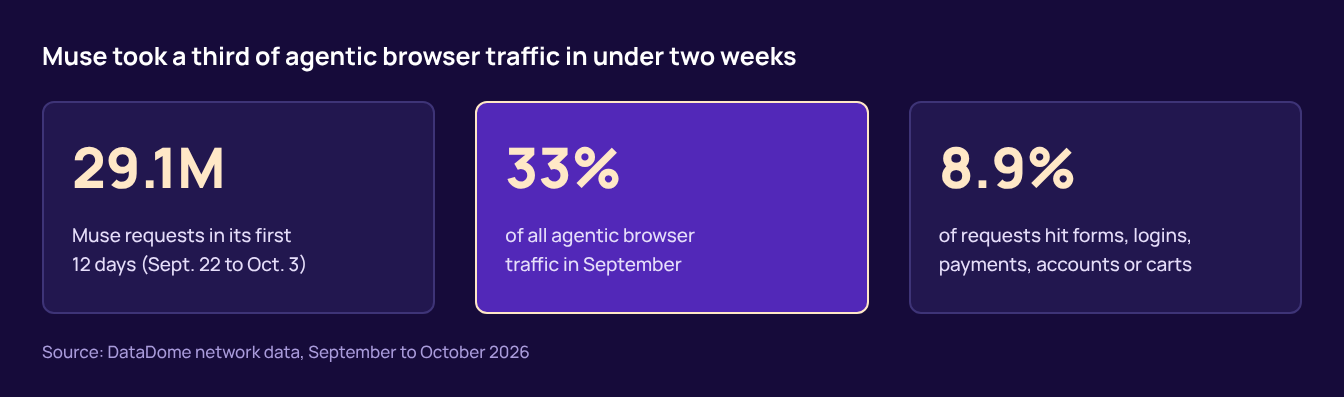
Muse grew fast. In its first 12 days of full availability, from Sept. 22 to Oct. 3, DataDome counted 29.1 million Muse requests on its network. Muse made up 33% of all agentic browser traffic in September. It was live for only nine of those days.
Muse also goes where the risk is. DataDome found that 8.9% of sampled Muse requests hit sensitive flows. These include forms, logins, payments, account creation and carts.
Amazon was the first big retailer to push back. It blocked Muse around Sept. 20. Amazon said Meta never told it Muse would access its store. It said the agent does not identify itself. It also raised concerns about credentials and access to order history. Amazon said third-party purchasing apps "should operate openly and respect service provider decisions about whether or not to participate."
Other merchants made a different call. DataDome reports that Shopify welcomed Muse traffic.
Both choices can be right. The problem is that most sites cannot make either choice today. You cannot allow, limit or block an agent you cannot see.
Blocking Muse is not foolproof
Amazon's block shows how hard this is in practice. Muse runs in a container where it can install and use apps however it wants, and it doesn't make requests from an identifiable IP range, so platforms have very little to anchor a block on. Amazon most likely blocks the specific Chromium fingerprint that Muse's built-in browser shows up with.
To test that, we simply asked Muse to set up a local Firefox instance and route its traffic through Muse's own egress proxy. It worked. Muse browsed Amazon with no problem and even sent us price alerts.
That's the core problem with blocking by fingerprint or IP address. Those signals describe the tool an agent happens to be using, not the agent or the person behind it, and an agent as flexible as Muse can switch tools whenever it's asked to. A lasting answer has to identify the agent itself.
What a Muse visit looks like
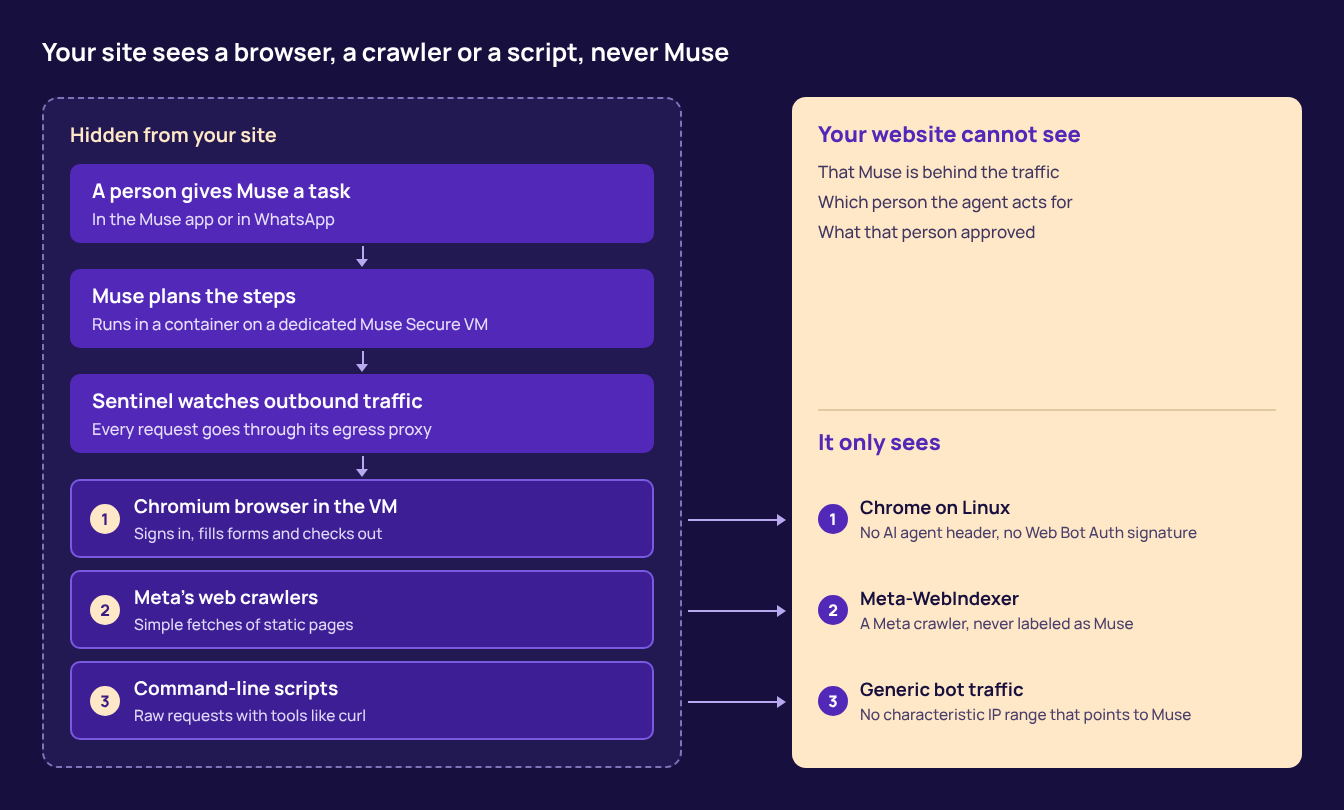
The agent, the person behind it and their approval all stay out of view. Your site only sees a browser, a crawler or a script.
What to do now: Know Your Agent
Agents like Muse are here to stay. Many of them will bring real buyers. The goal is not to block every agent. The goal is to know which agent is acting, for whom, and with what permission. We call this Know Your Agent, or KYA.
KYA comes down to three steps:
- Detect. See which visitors are humans, AI agents or bots. Do this before you change any rules.
- Enforce. Set policies for what agents can do. An agent might browse freely but need extra checks at login or checkout.
- Govern. Ask agents to carry verifiable credentials. These prove which person the agent acts for and what that person allowed.
Vouched KYA is built around these steps. Vouched KYA Detect is free and labels each visitor as human, AI agent or bot, with a confidence score from 0 to 100. It runs in observe-only mode, so it doesn't touch your checkout.
We also believe agent identity should be open. Vouched contributed KYA-OS, an open spec for agent identity and authorization, to the Decentralized Identity Foundation. We also run KnowThat.ai, a public registry of agent signatures.
A few questions to ask your team this week:
- Do we know how much of our traffic comes from AI agents?
- Which pages do agents reach, and are any of them login, payment or account pages?
- What is our policy for an agent that does not identify itself?
- How would a trusted agent prove who it works for?
The bottom line
Muse is an agent that acts for real people and touches real accounts. It can reach your site as a browser, a crawler or a script, and it doesn't tell you so in any of them.
That won't change on its own, and as our Amazon test shows, blocking one fingerprint or IP range won't hold for long. Your site needs a way to see agents, set rules for them and trust the ones that prove who they are. Start with visibility: try Vouched KYA Detect for free and see which agents are already on your site.
Sources
- Introducing Muse, Meta, September 2026
- Meta's Muse doesn't declare itself, DataDome
- How to detect Meta's Muse AI agent traffic, Fingerprint, Oct. 6, 2026
- Amazon blocks Meta's Muse AI assistant, GeekWire, Sept. 21, 2026
- Meta web crawlers, Meta for Developers