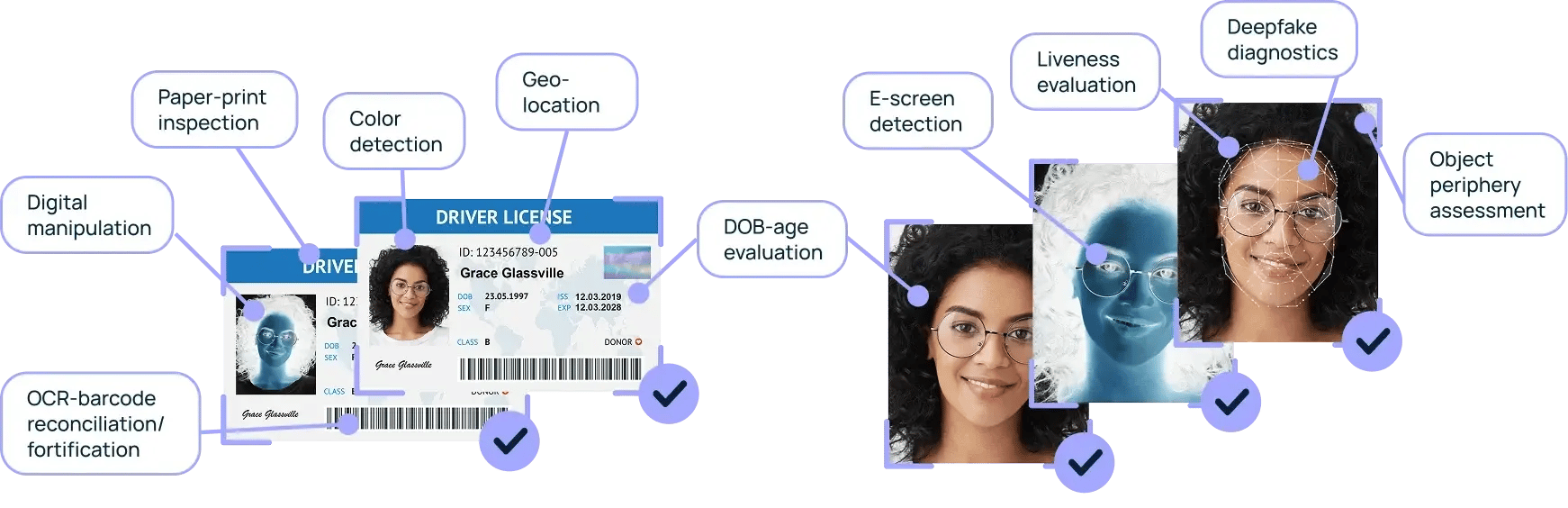
During ID capture and selfie verification, Vouched Verify runs 20 real-time fraud checks behind the scenes. Each one looks for a different trick, from a photo of a screen to a deepfake, without slowing your users down.
Fraud checks run while the ID and selfie are being captured, so stopping spoofing and tampering never costs you completion.
Checks
20
Real-time fraud checks across the ID and the selfie
Speed
<7s
From capture to result
Standard
ISO/IEC 30107-3
Biometric checks compliant with the presentation attack detection standard
ID fraud checks
Fourteen ways a fake ID gets caught.
From how the ID was captured to whether its data holds up, each check looks for a different kind of fraud.
Capture spoofing
Proving the ID was in front of the camera
Screen capture detection
Detects whether an ID was captured directly, or is a screen image taken from a phone, computer or tablet, one of the most common spoofing attempts.
Paper print detection
Flags IDs printed on paper that shouldn’t be, catching low-effort forgeries unless the document type explicitly allows paper formats.
The face on the ID
Checking the photo is genuine and consistent
Primary face detection
Checks the main face on the ID is clearly visible, with no blur, glare, hands or thumbs in the way.
ID faces comparison
Verifies that all face images on the ID, if there are several, are consistent with each other and legitimate.
Photo injection detection
Detects whether the face image on the ID has been digitally altered, swapped or tampered with.
Document integrity
Catching forged or altered documents
Image manipulation analysis
Reviews the entire ID image for signs of tampering, overlays or digital alterations.
Template matching
Confirms the ID matches trusted templates from Vouched’s proprietary library, checking layout, text placement and structural integrity.
Signature review
Identifies potentially fraudulent documents by uncovering signs of machine-generated or digitally forged signatures.
Field manipulation
Detects visual inconsistencies and modifications to specific fields that signal changes made after the ID was issued.
Stable ID pattern
Detects abnormal reuse of the same ID across selfies and ID documents in recent verification attempts.
Data consistency
Checking the data holds up
Known fraudulent names check
Automatically flags names that match known fraudulent identities, including test names used by government agencies and fictional characters.
Barcode vs. front image verification
Compares the barcode data with the front of the ID to detect inconsistencies or mismatched documents.
Barcode vs. user-submitted name
Checks that the name encoded in the barcode matches the name the user submitted.
Driver’s license vs. DMV records Optional
Validates the submitted driver’s license against official DMV records to confirm it’s authentic.
Selfie fraud checks
A real person, really present, really them.
The selfie is checked as closely as the ID, then matched back to it.
Real person detection
Validates that the selfie contains a real human, filtering out non-human objects such as pets, props or backgrounds.
Selfie quality analysis
Checks clarity, brightness and obstructions, so the image isn’t too blurry, too dark or partly covered.
Liveness detection
Uses biometric analysis to confirm the selfie is live and authentic, not a printed photo, an AI-generated image or a deepfake.
Selfie-to-ID face match
Matches the selfie to the primary face on the ID and, where there’s one, to secondary face images.
Selfie-to-ID face age match
Estimates the facial age in the selfie and compares it with the age expected from the ID’s date of birth, flagging inconsistencies.
Stable selfie pattern
Detects abnormal reuse of the same face across selfies and ID documents in recent verification attempts.
How a check works
Barcode vs. front image, in one example.
The barcode on the back of a driver’s license encodes the same details printed on the front. Vouched reads both and compares them field by field, then checks the name against the one the user typed in. When someone edits the printed front, the barcode gives it away.
Illustrative barcode versus front image comparison
Field
Front of ID
Barcode
Result
Name
Jordan Lee
Jordan Lee
Match
Date of birth
06/14/1990
06/14/1990
Match
Expiration date
06/14/2029
06/14/2024
Mismatch
Name entered by user
Jordan Lee typed
Jordan Lee
Match
ReviewThe printed expiration date doesn’t match the barcode, a sign the front was altered to make an expired ID look valid.
Illustrative data.
Built to stay accurate
Standards-based, and always improving.
ISO/IEC 30107-3 compliantVouched’s biometric checks comply with ISO/IEC 30107-3, the international standard for biometric presentation attack detection.
Human-reviewed AIHuman reviews quality-check Vouched’s AI models, and what they find is used to keep improving those models.
AI Management System reportSee how Vouched governs the AI behind its checks. The AI Management System report is available in the Trust Center.
Identity fraud detection checks whether the ID and selfie someone submits during verification are genuine. Vouched Verify runs real-time checks during ID capture and selfie verification to detect spoofing, tampering and manipulation, including screen captures, forged documents, AI-generated images and deepfakes.
How many fraud checks does Vouched run?
Vouched runs 20 real-time fraud checks during ID capture and selfie verification, and returns results in under seven seconds. They cover capture spoofing, the face on the ID, document integrity, data consistency and the selfie itself.
Can Vouched detect deepfakes and AI-generated selfies?
Yes. Vouched’s liveness detection uses biometric analysis to confirm a selfie is live and authentic, not a printed photo, an AI-generated image or a deepfake. Vouched’s biometric checks comply with ISO/IEC 30107-3.
What is ISO/IEC 30107-3?
ISO/IEC 30107-3 is the international standard for testing and reporting biometric presentation attack detection (PAD), which is how a system detects spoofs such as photos, masks or replayed video. Vouched’s biometric checks comply with it.
Can Vouched tell if an ID was photographed from a screen?
Yes. Screen capture detection identifies whether an ID was captured directly or is a screen image taken from a phone, computer or tablet, one of the most common spoofing attempts. Paper print detection also flags IDs printed on paper when the document type doesn’t allow it.
How does Vouched check the barcode on an ID?
Vouched compares the barcode data with the front of the ID to detect inconsistencies or mismatched documents, and checks that the name encoded in the barcode matches the name the user submitted.
Does Vouched check driver’s licenses against DMV records?
Yes, as an optional check. Vouched can validate a submitted driver’s license against official DMV records to confirm it’s authentic.
What is photo injection detection?
Photo injection detection checks whether the face image on an ID has been digitally altered, swapped or tampered with, so a fraudster can’t paste their own photo onto someone else’s document.
What is a stable selfie pattern check?
It detects abnormal facial reuse by identifying faces that appear repeatedly across selfies and ID documents in recent verification attempts, a common sign of someone trying multiple identities.
Do fraud checks slow down identity verification?
No. The checks run behind the scenes during ID capture and selfie verification, without adding steps for the user, and results come back in under seven seconds.
How does Vouched keep its fraud detection accurate?
Vouched continuously improves its platform by using human reviews to quality-check its AI models, and uses what those reviews find to improve the models. Its biometric checks comply with ISO/IEC 30107-3.
Where can I review how Vouched manages its AI?
Vouched’s AI Management System report is available in the Vouched Trust Center, alongside its other security and compliance documentation. Visit the Trust Center.