
- Platform
- Vouched Verify
- White label
Vouched Verify: white label
Your brand on every verification screen.
You set the colors, fonts, copy, images and consent styling, so identity verification looks and reads like the rest of your product. Your users see your brand. Vouched powers every check behind it.
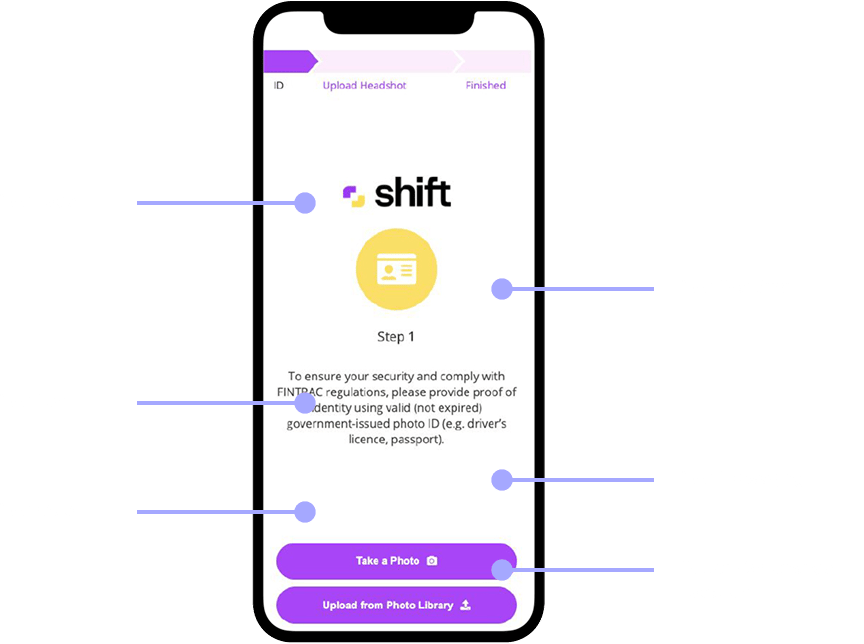
How it works
Brand it in four layers.
A cohesive journey from the first screen to the last builds trust and lifts completion. Most of it is set in one plugin configuration, and your Vouched team handles the rest.
Visual identity
Colors, fonts, component styling, your logo, buttons and illustrations.
See what you can set → 02Words
Rewrite every string your users read, in your voice and their language.
Rewrite the copy → 03Desktop to phone
Carry your styling across the handoff when users finish on their phone.
Style the handoff → 04Consent
Restyle the consent line, and name Vouched as your verification provider.
Style consent →Visual identity
Match your design system, down to the corner radius.
Set it in your plugin configuration and it applies on every screen, from the start of the flow to the done screen.
Brand colors
Your primary color carries through buttons, links, active states and the processing animation, alongside your background and link colors.
Set as hex values.Your fonts
Load your own hosted font file, or a Google Fonts stylesheet, so verification uses the same type as your product.
.woff2 .woff .ttf .otf, from plugin v3.117.0.Component styling
Match corner radius, spacing and button shape, plus inputs, dropdowns and headings, with standard CSS properties.
Tighter padding helps avoid scrolling on small screens.Your logo
Your logo appears at the start of the flow, sized to sit comfortably on every device.
SVG or PNG.Buttons and icons
Buttons take your colors, with Font Awesome icons set separately from the label text, or removed entirely.
Illustrations
Replace the instruction and done-screen illustrations with your own artwork, in your configuration or uploaded to your account with no code change.
PNGs, 1.5 MB or smaller each.Words
Every string, in your voice.
Rewrite the text your users see so the flow sounds like you, or carry a language Vouched doesn’t build in.
One content object rewrites headings, instructions, button labels, camera guidance, retry prompts and results messages.
Selected instruction and handoff fields accept HTML, so headings, subheads and bullets carry your typography.
Hide the step progress bar for a cleaner flow, or rename the steps to match your product’s language.
Follow the browser’s language automatically, let users pick on the start screen, or translate every string yourself.
enEnglishesSpanishes_ESSpanish (Spain)frFrenchfr_CAFrench (Canada)deGermanitItalianplPolishpt_BRPortuguese (Brazil)ruRussianukUkrainiantrTurkishzh_CNChinese (Simplified)arArabicfaPersian
Desktop to phone
Still your brand when they switch devices.
Users who start on a desktop often finish the ID and selfie on their phone. The handoff carries your styling the whole way.
The handoff screen
Style the description text and option cards, show the options as cards, and add your own image to one of them.
On the phone
Your theme sets the completion card, its text and the accents, so the last screen looks like the first.
QR code or link
Size the QR code, show it on its own, and choose whether to offer a link to finish on desktop.
For developers
One configuration. Every screen.
White labeling lives in the Vouched JS Plugin configuration: a theme for visual identity, a content object for words, and a handoff view for cross-device.
- Each component takes standard CSS properties under
style - Images in your configuration take priority over images on your account
- Options reflect plugin v3.149; self-hosted fonts need v3.117.0 or later
Vouched({
  publicKey: 'YOUR_PUBLIC_KEY',
  type: 'idv',
  locale: 'en',
  theme: {
    baseColor: '#1a365d',
    bgColor: '#ffffff',
    font: 'BrandSans',
    logo: { src: 'https://cdn.example.com/brand/logo.svg' },
    common: {
      font: {
        family: 'BrandSans',
        url: 'https://cdn.example.com/fonts/BrandSans-Regular.woff2'
      },
      buttons: { style: { borderRadius: '8px', textTransform: 'none' } }
    }
  },
  content: {
    upperStartInstructions: 'Verify your identity',
    startScreenButtonLabel: 'Get started'
  },
  handoffView: { deviceCard: true }
});
What stays fixed
A short list, so there are no surprises.
Almost everything is yours to change. These few elements stay fixed today.
- The consent line can be restyled and partly reworded, but not removed.
- The processing animation keeps its shape. Its color follows your brand.
- Default illustrations keep their own colors. Replace them with your own images to match your brand.
- Instruction text alignment is set inline, inside the fields that accept HTML.
Getting started
From brand assets to a branded demo.
- 1Send us your brand assetsEverything on the list is all we need to set up a branded demo.
- 2Review your demoOpen it on your own phone and see your brand on every screen.
- 3Build from your configurationVouched sends you the configuration behind your demo to build from.
What to send us
- Your brand colors as hex values
- Your font, as a hosted font file URL or a Google Font name
- Your logo as an SVG or PNG
- Any replacement illustrations, as PNGs of 1.5 MB or smaller
- The copy changes you want
- Whether the consent line should name Vouched as your provider
More in Vouched Verify
Establish identity, your way.
FAQ
White labeling, answered.
Straight answers about branding the Vouched verification flow.
Contact us with a questionWhat is white-label identity verification?
White-label identity verification lets you run identity checks under your own brand. Your colors, fonts, copy, logo and images appear on every verification screen, while Vouched Verify runs the checks behind them.
What can I customize in the Vouched verification flow?
You can set your brand colors, fonts and component styling, such as corner radius, spacing and button shape. You can add your logo, color your buttons, replace the illustrations, rewrite every on-screen string, choose the language, restyle the consent line, and style the desktop-to-phone handoff.
Can I use my own font?
Yes. From Vouched JS Plugin v3.117.0, you can load your own hosted font file in .woff2, .woff, .ttf or .otf format. A Google Fonts or other stylesheet URL works the same way.
Can I change the text users see during verification?
Yes. The content object rewrites the text on every screen, so the flow can match your tone of voice. Selected instruction and handoff fields also accept HTML, so headings, subheads and bullets can carry your typography.
Which languages does the Vouched verification flow support?
Fifteen languages are built in: English, Spanish, Spanish (Spain), French, French (Canada), German, Italian, Polish, Portuguese (Brazil), Russian, Ukrainian, Turkish, Chinese (Simplified), Arabic and Persian. The flow can also follow the browser’s language, offer a language picker on the start screen, and support any other language by rewriting its text.
Can I remove the consent line?
No. You can restyle the consent line and, in English, reword it to name Vouched as your identity verification provider, but it always stays on screen. It links to the privacy statement, the biometric privacy notice and the end user terms, and the biometric notice is a legal requirement for processing selfies.
Can I replace the illustrations in the verification flow?
Yes. Point your plugin configuration at your own hosted images, or send your Vouched team the images as PNGs of 1.5 MB or smaller each and they’ll apply them to your account, with no code change. A custom image never falls back to the default.
Does my branding carry over when users switch from desktop to phone?
Yes. The desktop-to-phone handoff carries your styling, including text colors, card borders and your own image. On the phone, your theme sets the completion card, its text and the accents.
What can’t be customized?
A short list stays fixed: the consent line can’t be removed, the processing animation keeps its shape (its color follows your brand), and default illustrations keep their own colors until you replace them.
Do I need to write code to white label Vouched?
Most branding is set in the Vouched JS Plugin configuration. Some changes need no code at all: send your replacement illustrations to your Vouched team and they’ll apply them to your account. Vouched also sends you the configuration from your branded demo to build from. See the JS Plugin documentation.
How do I get started with white labeling?
Send your Vouched team your brand colors as hex values, your font, your logo as an SVG or PNG, any replacement illustrations, the copy changes you want, and whether the consent line should name Vouched as your provider. You’ll review a branded demo on your own phone, then build from the configuration Vouched sends you.